
Up-to-date with version 3.0.5908
Menu Layout[]
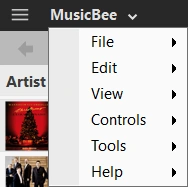

Show as Button


Show in Caption Bar
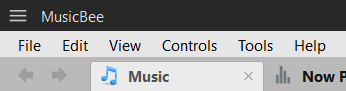

Show Below Caption Bar
There are three options for the main menu layout, which can be set in Layout Preferences or the Panels Configuration window.
- Show as Button (Default)
- Show in Caption Bar [the Tabs Bar and the Main Menu cannot both be in the Caption Bar]
- Show Below Caption Bar
Menus[]
Top Left Menu[]
The icon at the top left of the MusicBee window contains a menu with popular items from the other menus. For the similar menu in the Compact Player, see Compact Player.
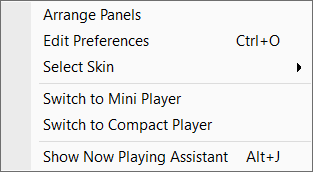

Top Left Menu
- Arrange Panels
- Edit Preferences
- Select Skin
- Switch to Mini Player
- Switch to Compact Player
- Show Now Playing Assistant
| Menus | ||||
|
| Layout | ||||||
|